
Iris - A Case Study
how I built applywithiris.com and the challenges I faced.
I hate job applications. They're so time consuming and you basically have to echo the same information to so many forms. I tried tools like Sorce but quickly realised they weren't built for people outside of the Americas. I couldn't find any jobs in Africa and even jobs in Europe were limited. The reason for this I found, was that they have crawlers that scrape the web. So I assume these crawlers have some set rules or paths they take to scrape the jobs and any job postings that don't align with those rules or lie along that path don't get picked up.
I wanted something that could pick up any job as long as it's on the internet. Something that I could use without feeling limited.
So I built ApplyWithIris. It has a feature where a browser-use agent automatically applies to jobs for you in a browser on a VPS/VM. This feature will be the main talking-point today.
Let's start by defining some core terms. We'll go with the simplest definitions possible here.
- Agent: An LLM with tools that enable it act on the result of it's reasoning.
- Browser-Use Agent: An Agent with browser based tools that allow it perform actions on the browser.
The Architecture
I think the best way to describe Iris' architecture is as both Client-Server and Layered. The core codebase (excl. the chrome extension and marketing page) are basically 3 main parts.
- The Frontend built with React-vite
- The API server built with Gin Golang
- The Temporal server/worker built with Golang
How do these map to each architecture stated prior
Client-Server (The macro architecture)
At a high level, the system uses the Client-Server model. The system is split into separate physical components that communicate over a network:
- The Client: The React frontend
- The Servers:
- The Backend API built with Go, which serves data and business logic.
- The Temporal Worker also built with Go, which handles background tasks and long-running workflows.
The Layered View (The Micro Architecture)
When we look inside the backend API itself, it uses a Layered Architecture.
┌────────────────────────────────────────────────────────┐
│ CLIENT (Next.js Frontend)                              │
│ • Component Layer (UI / React)                         │
│ • Data Fetching Layer (fetch calling the API)          │
└─────────────────────────┬──────────────────────────────┘
                          │ Network Request
                          ▼
┌────────────────────────────────────────────────────────┐
│ SERVER 1 (Backend API)                                 │
│ • API Layer (Routes / Controllers)                     │
│ • Business Layer (Services / Validation)               │
│ • Persistence Layer (ORM).                             │
└─────────────────────────┬──────────────────────────────┘
                          │ Triggers Workflow
                          ▼
┌────────────────────────────────────────────────────────┐
│ SERVER 2 (Temporal Worker)                             │
│ • Workflow Layer (Orchestration & State Machine)       │
│ • Activity Layer (Heavy lifting / Third-party APIs)    │
└────────────────────────────────────────────────────────┘
I'm going to skip explaining the frontend and the API. There's nothing interesting there. All the fun stuff happens in the Temporal worker.
A little about Temporal
First of all, it has come to my attention that many of you 🫵🏽 don't use Temporal.

If you've never heard of or used Temporal before, you're missing out. What most people think about when they hear Temporal (or at least the first thing that comes up when you search it up) is it's fault-tolerance and dynamic error handling. Which is in-fact at the core of it's functionalities. But temporal gives so much more. With AI agents, Temporal gives you visibility.
It does this using two core constructs:
- Activities: An Activity is a function that executes a single, small, well-defined task. This could be a DB operation, an API call etc.
- Workflows: A workflow is basically collection of activities (small tasks) that solve a problem.
In our specific case, the workflow was the Job Application and it called numerous smaller activities to achieve that goal.
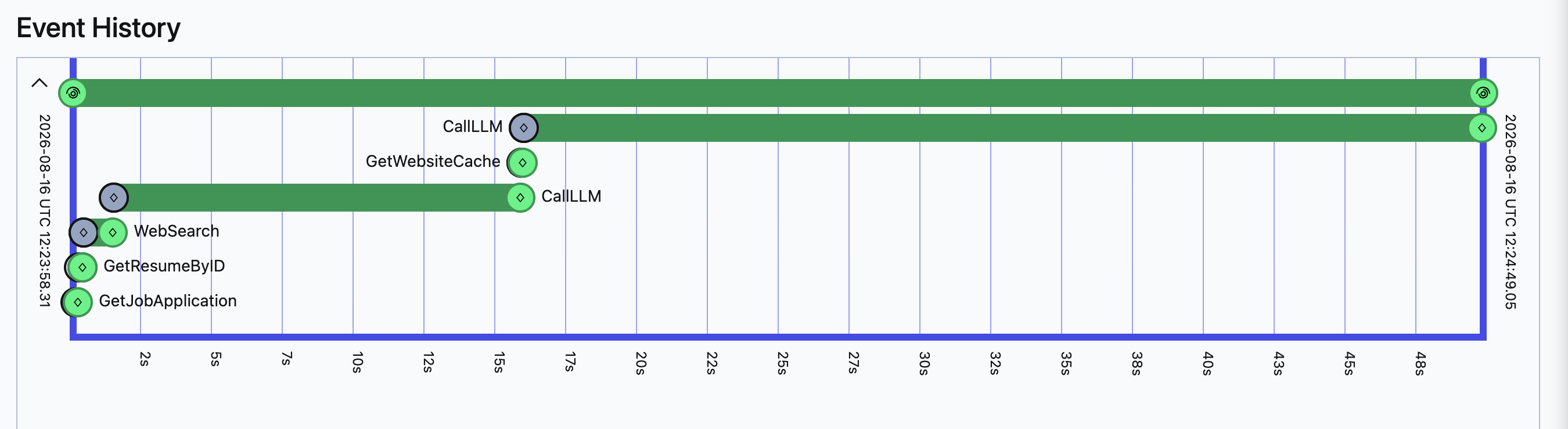 Execution flow of a workflow in Temporal
Combine this with Sentry, PostHog and/or any other error tracking/monitoring tool and you have all you need to figure out what went wrong when something breaks.
Temporal, job applications and the browser-use agent
Here's a rundown of the design. Job applications run inside of a Temporal workflow. In the workflow, which we'll call JobApplicationWorkflow, the core design is that of a perception loop. The workflow:
- Loads the application data.
- Spins up an incognito tab on the browser and opens the job application page.
- Then in a loop:
- Takes screenshots of the page, tags the screenshots and pulls the page's accessibility tree.
- Feeds all the data into an LLM "planner"
- The planner calls tools that click buttons, type etc. The loop runs until the planner successfully submits the application. This is an extremely simplified explanation of things but you get the gist.
The major challenge with browser automation
While testing the initial prototype, I came across a recurring problem that wanted to take my life. I even get chills writing about it. The problem of bot detection.

Bot detection
I went through the complete 5 stages of grief trying to solve this one. Let's talk about the two most long-lasting stages.
Denial: Solutions I tried
As you read this section picture me doing this every 30 minutes.
 The first thing I did ...and what would probably be your first step on any browser automation projects you might have worked on would be to run the browser in stealth mode. Most browser libraries give you this out of the box or provide a plugin for this so it's not a problem to implement at all. I used go-rod. The golden question:
Did it work?
Of course not, if you solve a problem on the first try then it wasn't a problem duh. Honestly, I don't even think this does anything if you ask me. Then again, I've never not run an automated browser in stealth mode so I don't how the experience would've been without.
Next, I ran the browser in NewUserMode. This preset reuses the regular user data folder and login sessions (like existing cookies or extensions) so automation runs inside your established personal profile. I am aware of the danger of doing this. Session pollution where one application's state pollutes another application. But that wasn't exactly possible in my setup. The agent didn't have the ability to perform any login operations, there were strict guardrails that stopped it from doing anything outside of the pages related to the job application it was filling and every application ran in an incognito context.
Still didn't work of course.
Finally, I decided to approach it differently. Since it was impossible for the agent to completely avoid detection, let's give the agent the ability to solve captchas instead. So I got to researching. After a few days and couple of conversations with my mentors ...ChatGPT, Claude and Gemini of course, I was ready to build a tool to do this. The solution was to outsource the captcha tasks using either 2captcha or capsolver. Plan was simple enough.
At every loop iteration, right after taking the screenshot, we will run a script to check the DOM for any captcha prompts.
If we find one, we call a function that reads the DOM for the arguments to the Capsolver API call and make the call in a Temporal Activity. Capsolver handles it and we get a code/token in return for us to feed back to the captcha iframe/element in the DOM. The challenge was that it is difficult to get the TaskType (one of the arguments needed for the Capsolver endpoint requires) from the DOM. To solve this problem, I had Claude Code run tens of applications I knew would trigger captchas and debug TaskType errors as they surfaced. With this, the agent was able to solve quite a number of captcha types reliably. But this wasn't quite reliable enough.
We couldn't solve ReCaptchaV3Task (I wish I could explain what this means but there are no characteristics I can use to describe the task types. Plus you can't tell visually) types reliably and these came up quite a bit. Indeed was the worst ...The agent couldn't even open the website without being hit with an unsolvable one. There were also cases where the agent would solve the captcha but application would get flagged for automation from the backend so when you click the submit button you get an error message.
The latter problem was kind of a signal for me to rethink because I was getting zero insight into why the application was getting flagged. I didn't even know where to start from in solving the problem. I could've kept the Capsolver experiment going but to get access to more powerful tools from the API I would've had to pay more money and I couldn't afford an enterprise plan.
Acceptance: My final decision
I decided to pivot a bit. I will still keep on improving the browser agent and trying to solve the bot detection problem. However, In the last few weeks/months I feel like I have spent so much more time solving that bot detection than solving the main problem I was building it to solve.
Speeding up the application process
So I decided to go a different route. Assisted applications instead of completely autonomous. Think cursor for job applications. Vision for this is basically having the Iris chrome extension in a sidebar like you have the cursor chat. And it handles the applications in your own browser. This is in no way an agent. It's a totally different workflow from the JobApplicationWorkflow. It has access to the job description, the fields on the page (so it can automatically fill them), your resumé as well as open tabs in your browser to pull additional context. If you come across a login page or a Captcha puzzle, you can handle those while the extension handles the rest.

Conclusion
If you were expecting to hear a solution to the browser automation problem, I'm sorry. However, I hope I was able to steer you in some (right or wrong doesn't matter as long as you learned something) direction with my experience. If you identified any mistakes I may have made, you're welcome! Now you know what not to do next time. And if you think this entire article was crap, that's your business.

Thank you for reading!